

Note
Go to the end to download the full example code.
Cropped Decoding on BCIC IV 2a Dataset#
Building on the Trialwise Decoding, we now do more data-efficient cropped decoding!
In Braindecode, there are two supported configurations created for training models: trialwise decoding and cropped decoding. We will explain this visually by comparing trialwise to cropped decoding.
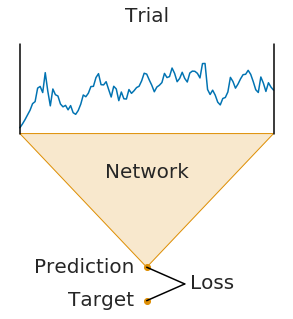
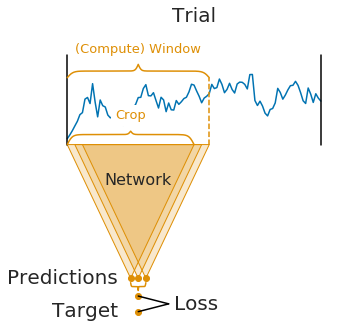
On the left, you see trialwise decoding:
A complete trial is pushed through the network.
The network produces a prediction.
The prediction is compared to the target (label) for that trial to compute the loss.
On the right, you see cropped decoding:
Instead of a complete trial, crops are pushed through the network.
For computational efficiency, multiple neighbouring crops are pushed through the network simultaneously (these neighbouring crops are called compute windows)
Therefore, the network produces multiple predictions (one per crop in the window)
The individual crop predictions are AVERAGED before computing the loss function
This averaging of predictions of small sub-windows is the key difference between trialwise and cropped decoding. It was introduced in [1] and it impact on the parameters of the network.
It is important to note that the averaging of predictions is only done during training. During testing, the network is still applied to crops and the predictions are averaged afterwards.
Note
The network architecture implicitly defines the crop size (it is the receptive field size, i.e., the number of timesteps the network uses to make a single prediction)
The window size is a user-defined hyperparameter, called
n_timesin Braindecode. It mostly affects runtime (larger window sizes should be faster). As a rule of thumb, you can set it to two times the crop size.Crop size and window size together define how many predictions the network makes per window:
#window - #crop + 1 = #predictions
Note
For cropped decoding, the above training setup is mathematically similar to sampling crops in your dataset, pushing them through the network and training directly on the individual crops. However, the if their position would be randomly selected, the crops would be less correlated in contrast to the neighbourhood crops selected from a window. At the same time, the above training setup is much faster as it avoids redundant computations by using dilated convolutions, see [2]. However, the two setups are only mathematically related in case (1) your network does not use any padding or only left padding and (2) your loss function leads to the same gradients when using the averaged output. The first is true for our shallow and deep ConvNet models and the second is true for the log-softmax outputs and negative log likelihood loss that is typically used for classification in PyTorch.
Loading and preprocessing the dataset#
Loading and preprocessing stays the same as in the Trialwise decoding tutorial.
from braindecode.datasets import MOABBDataset

subject_id = 3
dataset = MOABBDataset(dataset_name="BNCI2014_001", subject_ids=[subject_id])

from numpy import multiply

from braindecode.preprocessing import (
    Preprocessor,
    exponential_moving_standardize,
    preprocess,
)

low_cut_hz = 4.0  # low cut frequency for filtering
high_cut_hz = 38.0  # high cut frequency for filtering
# Parameters for exponential moving standardization
factor_new = 1e-3
init_block_size = 1000
# Factor to convert from V to uV
factor = 1e6

preprocessors = [
    Preprocessor("pick_types", eeg=True, meg=False, stim=False),
    # Keep EEG sensors
    Preprocessor(lambda data: multiply(data, factor)),  # Convert from V to uV
    Preprocessor("filter", l_freq=low_cut_hz, h_freq=high_cut_hz),
    # Bandpass filter
    Preprocessor(
        exponential_moving_standardize,
        # Exponential moving standardization
        factor_new=factor_new,
        init_block_size=init_block_size,
    ),
]

# Transform the data
preprocess(dataset, preprocessors, n_jobs=-1)
/opt/hostedtoolcache/Python/3.12.16/x64/lib/python3.12/site-packages/moabb/datasets/bnci/base.py:456: FutureWarning: Montage name 'standard_1005' is deprecated and will be removed in MNE 1.14. Use 'colin27_1005' instead.
  montage = make_standard_montage("standard_1005")
/opt/hostedtoolcache/Python/3.12.16/x64/lib/python3.12/site-packages/moabb/datasets/bnci/base.py:456: FutureWarning: Montage name 'standard_1005' is deprecated and will be removed in MNE 1.14. Use 'colin27_1005' instead.
  montage = make_standard_montage("standard_1005")
/opt/hostedtoolcache/Python/3.12.16/x64/lib/python3.12/site-packages/moabb/datasets/bnci/base.py:456: FutureWarning: Montage name 'standard_1005' is deprecated and will be removed in MNE 1.14. Use 'colin27_1005' instead.
  montage = make_standard_montage("standard_1005")
/opt/hostedtoolcache/Python/3.12.16/x64/lib/python3.12/site-packages/moabb/datasets/bnci/base.py:456: FutureWarning: Montage name 'standard_1005' is deprecated and will be removed in MNE 1.14. Use 'colin27_1005' instead.
  montage = make_standard_montage("standard_1005")
/opt/hostedtoolcache/Python/3.12.16/x64/lib/python3.12/site-packages/moabb/datasets/bnci/base.py:456: FutureWarning: Montage name 'standard_1005' is deprecated and will be removed in MNE 1.14. Use 'colin27_1005' instead.
  montage = make_standard_montage("standard_1005")
/opt/hostedtoolcache/Python/3.12.16/x64/lib/python3.12/site-packages/moabb/datasets/bnci/base.py:456: FutureWarning: Montage name 'standard_1005' is deprecated and will be removed in MNE 1.14. Use 'colin27_1005' instead.
  montage = make_standard_montage("standard_1005")
/opt/hostedtoolcache/Python/3.12.16/x64/lib/python3.12/site-packages/moabb/datasets/bnci/base.py:456: FutureWarning: Montage name 'standard_1005' is deprecated and will be removed in MNE 1.14. Use 'colin27_1005' instead.
  montage = make_standard_montage("standard_1005")
/opt/hostedtoolcache/Python/3.12.16/x64/lib/python3.12/site-packages/moabb/datasets/bnci/base.py:456: FutureWarning: Montage name 'standard_1005' is deprecated and will be removed in MNE 1.14. Use 'colin27_1005' instead.
  montage = make_standard_montage("standard_1005")
/opt/hostedtoolcache/Python/3.12.16/x64/lib/python3.12/site-packages/moabb/datasets/bnci/base.py:456: FutureWarning: Montage name 'standard_1005' is deprecated and will be removed in MNE 1.14. Use 'colin27_1005' instead.
  montage = make_standard_montage("standard_1005")
/opt/hostedtoolcache/Python/3.12.16/x64/lib/python3.12/site-packages/moabb/datasets/bnci/base.py:456: FutureWarning: Montage name 'standard_1005' is deprecated and will be removed in MNE 1.14. Use 'colin27_1005' instead.
  montage = make_standard_montage("standard_1005")
/opt/hostedtoolcache/Python/3.12.16/x64/lib/python3.12/site-packages/moabb/datasets/bnci/base.py:456: FutureWarning: Montage name 'standard_1005' is deprecated and will be removed in MNE 1.14. Use 'colin27_1005' instead.
  montage = make_standard_montage("standard_1005")
/opt/hostedtoolcache/Python/3.12.16/x64/lib/python3.12/site-packages/moabb/datasets/bnci/base.py:456: FutureWarning: Montage name 'standard_1005' is deprecated and will be removed in MNE 1.14. Use 'colin27_1005' instead.
  montage = make_standard_montage("standard_1005")
/opt/hostedtoolcache/Python/3.12.16/x64/lib/python3.12/site-packages/moabb/datasets/bnci/base.py:456: FutureWarning: Montage name 'standard_1005' is deprecated and will be removed in MNE 1.14. Use 'colin27_1005' instead.
  montage = make_standard_montage("standard_1005")
/opt/hostedtoolcache/Python/3.12.16/x64/lib/python3.12/site-packages/moabb/datasets/bnci/base.py:456: FutureWarning: Montage name 'standard_1005' is deprecated and will be removed in MNE 1.14. Use 'colin27_1005' instead.
  montage = make_standard_montage("standard_1005")
/opt/hostedtoolcache/Python/3.12.16/x64/lib/python3.12/site-packages/moabb/datasets/bnci/base.py:456: FutureWarning: Montage name 'standard_1005' is deprecated and will be removed in MNE 1.14. Use 'colin27_1005' instead.
  montage = make_standard_montage("standard_1005")
/opt/hostedtoolcache/Python/3.12.16/x64/lib/python3.12/site-packages/moabb/datasets/bnci/base.py:456: FutureWarning: Montage name 'standard_1005' is deprecated and will be removed in MNE 1.14. Use 'colin27_1005' instead.
  montage = make_standard_montage("standard_1005")
/opt/hostedtoolcache/Python/3.12.16/x64/lib/python3.12/site-packages/moabb/datasets/bnci/base.py:456: FutureWarning: Montage name 'standard_1005' is deprecated and will be removed in MNE 1.14. Use 'colin27_1005' instead.
  montage = make_standard_montage("standard_1005")
/opt/hostedtoolcache/Python/3.12.16/x64/lib/python3.12/site-packages/moabb/datasets/bnci/base.py:456: FutureWarning: Montage name 'standard_1005' is deprecated and will be removed in MNE 1.14. Use 'colin27_1005' instead.
  montage = make_standard_montage("standard_1005")
/home/runner/work/braindecode/braindecode/braindecode/preprocessing/preprocess.py:82: UserWarning: apply_on_array can only be True if fn is a callable function. Automatically correcting to apply_on_array=False.
  warn(
/home/runner/work/braindecode/braindecode/braindecode/preprocessing/preprocess.py:80: UserWarning: Preprocessing choices with lambda functions cannot be saved.
  warn("Preprocessing choices with lambda functions cannot be saved.")
NOTE: pick_types() is a legacy function. New code should use inst.pick(...).
NOTE: pick_types() is a legacy function. New code should use inst.pick(...).
NOTE: pick_types() is a legacy function. New code should use inst.pick(...).
NOTE: pick_types() is a legacy function. New code should use inst.pick(...).
Filtering raw data in 1 contiguous segment
Setting up band-pass filter from 4 - 38 Hz

FIR filter parameters
---------------------
Designing a one-pass, zero-phase, non-causal bandpass filter:
- Windowed time-domain design (firwin) method
- Hamming window with 0.0194 passband ripple and 53 dB stopband attenuation
- Lower passband edge: 4.00
- Lower transition bandwidth: 2.00 Hz (-6 dB cutoff frequency: 3.00 Hz)
- Upper passband edge: 38.00 Hz
- Upper transition bandwidth: 9.50 Hz (-6 dB cutoff frequency: 42.75 Hz)
- Filter length: 413 samples (1.652 s)

Filtering raw data in 1 contiguous segment
Setting up band-pass filter from 4 - 38 Hz

FIR filter parameters
---------------------
Designing a one-pass, zero-phase, non-causal bandpass filter:
- Windowed time-domain design (firwin) method
- Hamming window with 0.0194 passband ripple and 53 dB stopband attenuation
- Lower passband edge: 4.00
- Lower transition bandwidth: 2.00 Hz (-6 dB cutoff frequency: 3.00 Hz)
- Upper passband edge: 38.00 Hz
- Upper transition bandwidth: 9.50 Hz (-6 dB cutoff frequency: 42.75 Hz)
- Filter length: 413 samples (1.652 s)

Filtering raw data in 1 contiguous segment
Setting up band-pass filter from 4 - 38 Hz

FIR filter parameters
---------------------
Designing a one-pass, zero-phase, non-causal bandpass filter:
- Windowed time-domain design (firwin) method
- Hamming window with 0.0194 passband ripple and 53 dB stopband attenuation
- Lower passband edge: 4.00
- Lower transition bandwidth: 2.00 Hz (-6 dB cutoff frequency: 3.00 Hz)
- Upper passband edge: 38.00 Hz
- Upper transition bandwidth: 9.50 Hz (-6 dB cutoff frequency: 42.75 Hz)
- Filter length: 413 samples (1.652 s)

Filtering raw data in 1 contiguous segment
Setting up band-pass filter from 4 - 38 Hz

FIR filter parameters
---------------------
Designing a one-pass, zero-phase, non-causal bandpass filter:
- Windowed time-domain design (firwin) method
- Hamming window with 0.0194 passband ripple and 53 dB stopband attenuation
- Lower passband edge: 4.00
- Lower transition bandwidth: 2.00 Hz (-6 dB cutoff frequency: 3.00 Hz)
- Upper passband edge: 38.00 Hz
- Upper transition bandwidth: 9.50 Hz (-6 dB cutoff frequency: 42.75 Hz)
- Filter length: 413 samples (1.652 s)

NOTE: pick_types() is a legacy function. New code should use inst.pick(...).
Filtering raw data in 1 contiguous segment
Setting up band-pass filter from 4 - 38 Hz

FIR filter parameters
---------------------
Designing a one-pass, zero-phase, non-causal bandpass filter:
- Windowed time-domain design (firwin) method
- Hamming window with 0.0194 passband ripple and 53 dB stopband attenuation
- Lower passband edge: 4.00
- Lower transition bandwidth: 2.00 Hz (-6 dB cutoff frequency: 3.00 Hz)
- Upper passband edge: 38.00 Hz
- Upper transition bandwidth: 9.50 Hz (-6 dB cutoff frequency: 42.75 Hz)
- Filter length: 413 samples (1.652 s)

NOTE: pick_types() is a legacy function. New code should use inst.pick(...).
NOTE: pick_types() is a legacy function. New code should use inst.pick(...).
Filtering raw data in 1 contiguous segment
Setting up band-pass filter from 4 - 38 Hz

FIR filter parameters
---------------------
Designing a one-pass, zero-phase, non-causal bandpass filter:
- Windowed time-domain design (firwin) method
- Hamming window with 0.0194 passband ripple and 53 dB stopband attenuation
- Lower passband edge: 4.00
- Lower transition bandwidth: 2.00 Hz (-6 dB cutoff frequency: 3.00 Hz)
- Upper passband edge: 38.00 Hz
- Upper transition bandwidth: 9.50 Hz (-6 dB cutoff frequency: 42.75 Hz)
- Filter length: 413 samples (1.652 s)

NOTE: pick_types() is a legacy function. New code should use inst.pick(...).
Filtering raw data in 1 contiguous segment
Setting up band-pass filter from 4 - 38 Hz

FIR filter parameters
---------------------
Designing a one-pass, zero-phase, non-causal bandpass filter:
- Windowed time-domain design (firwin) method
- Hamming window with 0.0194 passband ripple and 53 dB stopband attenuation
- Lower passband edge: 4.00
- Lower transition bandwidth: 2.00 Hz (-6 dB cutoff frequency: 3.00 Hz)
- Upper passband edge: 38.00 Hz
- Upper transition bandwidth: 9.50 Hz (-6 dB cutoff frequency: 42.75 Hz)
- Filter length: 413 samples (1.652 s)

Filtering raw data in 1 contiguous segment
Setting up band-pass filter from 4 - 38 Hz

FIR filter parameters
---------------------
Designing a one-pass, zero-phase, non-causal bandpass filter:
- Windowed time-domain design (firwin) method
- Hamming window with 0.0194 passband ripple and 53 dB stopband attenuation
- Lower passband edge: 4.00
- Lower transition bandwidth: 2.00 Hz (-6 dB cutoff frequency: 3.00 Hz)
- Upper passband edge: 38.00 Hz
- Upper transition bandwidth: 9.50 Hz (-6 dB cutoff frequency: 42.75 Hz)
- Filter length: 413 samples (1.652 s)

NOTE: pick_types() is a legacy function. New code should use inst.pick(...).
Filtering raw data in 1 contiguous segment
Setting up band-pass filter from 4 - 38 Hz

FIR filter parameters
---------------------
Designing a one-pass, zero-phase, non-causal bandpass filter:
- Windowed time-domain design (firwin) method
- Hamming window with 0.0194 passband ripple and 53 dB stopband attenuation
- Lower passband edge: 4.00
- Lower transition bandwidth: 2.00 Hz (-6 dB cutoff frequency: 3.00 Hz)
- Upper passband edge: 38.00 Hz
- Upper transition bandwidth: 9.50 Hz (-6 dB cutoff frequency: 42.75 Hz)
- Filter length: 413 samples (1.652 s)

NOTE: pick_types() is a legacy function. New code should use inst.pick(...).
NOTE: pick_types() is a legacy function. New code should use inst.pick(...).
NOTE: pick_types() is a legacy function. New code should use inst.pick(...).
Filtering raw data in 1 contiguous segment
Setting up band-pass filter from 4 - 38 Hz

FIR filter parameters
---------------------
Designing a one-pass, zero-phase, non-causal bandpass filter:
- Windowed time-domain design (firwin) method
- Hamming window with 0.0194 passband ripple and 53 dB stopband attenuation
- Lower passband edge: 4.00
- Lower transition bandwidth: 2.00 Hz (-6 dB cutoff frequency: 3.00 Hz)
- Upper passband edge: 38.00 Hz
- Upper transition bandwidth: 9.50 Hz (-6 dB cutoff frequency: 42.75 Hz)
- Filter length: 413 samples (1.652 s)

Filtering raw data in 1 contiguous segment
Setting up band-pass filter from 4 - 38 Hz

FIR filter parameters
---------------------
Designing a one-pass, zero-phase, non-causal bandpass filter:
- Windowed time-domain design (firwin) method
- Hamming window with 0.0194 passband ripple and 53 dB stopband attenuation
- Lower passband edge: 4.00
- Lower transition bandwidth: 2.00 Hz (-6 dB cutoff frequency: 3.00 Hz)
- Upper passband edge: 38.00 Hz
- Upper transition bandwidth: 9.50 Hz (-6 dB cutoff frequency: 42.75 Hz)
- Filter length: 413 samples (1.652 s)

Filtering raw data in 1 contiguous segment
Setting up band-pass filter from 4 - 38 Hz

FIR filter parameters
---------------------
Designing a one-pass, zero-phase, non-causal bandpass filter:
- Windowed time-domain design (firwin) method
- Hamming window with 0.0194 passband ripple and 53 dB stopband attenuation
- Lower passband edge: 4.00
- Lower transition bandwidth: 2.00 Hz (-6 dB cutoff frequency: 3.00 Hz)
- Upper passband edge: 38.00 Hz
- Upper transition bandwidth: 9.50 Hz (-6 dB cutoff frequency: 42.75 Hz)
- Filter length: 413 samples (1.652 s)
Create model and compute windowing parameters#
In contrast to trialwise decoding, we first have to create the model before we can cut the dataset into windows. This is because we need to know the neural network parameters to know how large the sub-window stride should be.
We first choose the compute/input window size that will be fed to the network during training. This has to be larger than the networks the number of timesteps size and can otherwise be chosen for computational efficiency (see explanations in the beginning of this tutorial). Here we choose 1000 samples, which are 4 seconds for the 250 Hz sampling rate.
n_times = 1000
Now we create the model. To enable it to be used in cropped decoding
efficiently, we manually set the length of the final convolution layer
to some length that makes the number of timesteps of the ConvNet smaller
than n_times (see final_conv_length=30 in the model
definition).
import torch

from braindecode.models import ShallowFBCSPNet
from braindecode.util import set_random_seeds

cuda = torch.cuda.is_available()  # check if GPU is available, if True chooses to use it
device = "cuda" if cuda else "cpu"
if cuda:
    torch.backends.cudnn.benchmark = True
# Set random seed to be able to roughly reproduce results
# Note that with cudnn benchmark set to True, GPU indeterminism
# may still make results substantially different between runs.
# To obtain more consistent results at the cost of increased computation time,
# you can set `cudnn_benchmark=False` in `set_random_seeds`
# or remove `torch.backends.cudnn.benchmark = True`
seed = 20200220
set_random_seeds(seed=seed, cuda=cuda)

n_classes = 4
classes = list(range(n_classes))
# Extract number of chans from dataset
n_chans = dataset[0][0].shape[0]

model = ShallowFBCSPNet(
    n_chans,
    n_classes,
    n_times=n_times,
    final_conv_length=30,
)

# Display torchinfo table describing the model
print(model)

# Send model to GPU
if cuda:
    _ = model.cuda()
=================================================================================================================================================
Layer (type (var_name):depth-idx)             Input Shape               Output Shape              Param #                   Kernel Shape
=================================================================================================================================================
ShallowFBCSPNet (ShallowFBCSPNet)             [1, 22, 1000]             [1, 4, 32]                --                        --
├─Ensure4d (ensuredims): 1-1                  [1, 22, 1000]             [1, 22, 1000, 1]          --                        --
├─Rearrange (dimshuffle): 1-2                 [1, 22, 1000, 1]          [1, 1, 1000, 22]          --                        --
├─CombinedConv (conv_time_spat): 1-3          [1, 1, 1000, 22]          [1, 40, 976, 1]           36,240                    --
├─BatchNorm2d (bnorm): 1-4                    [1, 40, 976, 1]           [1, 40, 976, 1]           80                        --
├─Square (conv_nonlin_exp): 1-5               [1, 40, 976, 1]           [1, 40, 976, 1]           --                        --
├─AvgPool2d (pool): 1-6                       [1, 40, 976, 1]           [1, 40, 61, 1]            --                        [75, 1]
├─SafeLog (pool_nonlin_exp): 1-7              [1, 40, 61, 1]            [1, 40, 61, 1]            --                        --
├─Dropout (drop): 1-8                         [1, 40, 61, 1]            [1, 40, 61, 1]            --                        --
├─Sequential (final_layer): 1-9               [1, 40, 61, 1]            [1, 4, 32]                --                        --
│    └─Conv2d (conv_classifier): 2-1          [1, 40, 61, 1]            [1, 4, 32, 1]             4,804                     [30, 1]
│    └─SqueezeFinalOutput (squeeze): 2-2      [1, 4, 32, 1]             [1, 4, 32]                --                        --
│    │    └─Rearrange (squeeze): 3-1          [1, 4, 32, 1]             [1, 4, 32]                --                        --
=================================================================================================================================================
Total params: 41,124
Trainable params: 41,124
Non-trainable params: 0
Total mult-adds (Units.MEGABYTES): 0.15
=================================================================================================================================================
Input size (MB): 0.09
Forward/backward pass size (MB): 0.31
Params size (MB): 0.02
Estimated Total Size (MB): 0.42
=================================================================================================================================================
And now we transform model with strides to a model that outputs dense prediction, so we can use it to obtain predictions for all crops.
To know the models’ output shape without the last layer, we calculate the shape of model output for a dummy input.
Cut the data into windows#
In contrast to trialwise decoding, we have to supply an explicit
window size and window stride to the
braindecode.preprocessing.create_windows_from_events() function.
from braindecode.preprocessing import create_windows_from_events

trial_start_offset_seconds = -0.5
# Extract sampling frequency, check that they are same in all datasets
sfreq = dataset.datasets[0].raw.info["sfreq"]
assert all([ds.raw.info["sfreq"] == sfreq for ds in dataset.datasets])

# Calculate the trial start offset in samples.
trial_start_offset_samples = int(trial_start_offset_seconds * sfreq)

# Create windows using braindecode function for this. It needs parameters to define how
# trials should be used.
windows_dataset = create_windows_from_events(
    dataset,
    trial_start_offset_samples=trial_start_offset_samples,
    trial_stop_offset_samples=0,
    window_size_samples=n_times,
    window_stride_samples=n_preds_per_input,
    on_last_window="overlap",
    preload=True,
)
Split the dataset#
This code is the same as in trialwise decoding.
Training#
In difference to trialwise decoding, we now should supply
cropped=True to the EEGClassifier, and CroppedLoss as the criterion,
as well as criterion__loss_function as the loss function
applied to the meaned predictions.
Note
In this tutorial, we use some default parameters that we have found to work well for motor decoding, however we strongly encourage you to perform your own hyperparameter optimization using cross validation on your training data.
from skorch.callbacks import EarlyStopping, LRScheduler
from skorch.helper import predefined_split

from braindecode import EEGClassifier
from braindecode.training import CroppedLoss

# These values we found good for shallow network:
lr = 0.0625 * 0.01
weight_decay = 0

# For deep4 they should be:
# lr = 1 * 0.01
# weight_decay = 0.5 * 0.001

batch_size = 64
n_epochs = 4

clf = EEGClassifier(
    model,
    cropped=True,
    criterion=CroppedLoss,
    criterion__loss_function=torch.nn.functional.cross_entropy,
    optimizer=torch.optim.AdamW,
    train_split=predefined_split(valid_set),
    optimizer__lr=lr,
    optimizer__weight_decay=weight_decay,
    iterator_train__shuffle=True,
    batch_size=batch_size,
    callbacks=[
        "accuracy",
        ("lr_scheduler", LRScheduler("CosineAnnealingLR", T_max=max(1, n_epochs - 1))),
        ("early_stopping", EarlyStopping(patience=10, load_best=True)),
    ],
    device=device,
    classes=classes,
)
# Model training for a specified number of epochs. ``y`` is None as it is
# already supplied in the dataset.
clf.fit(train_set, y=None, epochs=n_epochs)
  epoch    train_accuracy    train_loss    valid_accuracy    valid_loss      lr      dur
-------  ----------------  ------------  ----------------  ------------  ------  -------
      1            0.2500        1.2699            0.2500        4.5043  0.0006  16.4585
      2            0.4410        1.0215            0.4340        3.1531  0.0005  16.2182
      3            0.4653        0.9131            0.4514        1.9437  0.0002  15.8424
      4            0.5139        0.8855            0.5174        1.2598  0.0000  15.2191
Training for longer#
The gallery build above uses only n_epochs = 4. When trained
offline for up to 100 epochs with early stopping, the model reaches
83.7 % accuracy on the held-out session (chance = 25 %).
We can load the pretrained checkpoint from the Hugging Face Hub and inspect the full training curves:
import warnings

repo_id = "braindecode/plot_bcic_iv_2a_moabb_cropped"
try:
    from huggingface_hub import hf_hub_download

    # Download before initialize(), which would discard the trained model
    f_params = hf_hub_download(repo_id, "params.safetensors")
    f_history = hf_hub_download(repo_id, "history.json")
    clf.initialize()
    clf.load_params(f_params=f_params, f_history=f_history, use_safetensors=True)
except Exception as exc:
    warnings.warn(
        f"Could not load pretrained checkpoint from {repo_id} ({exc}); "
        "continuing with the locally trained short-run model.",
        stacklevel=2,
    )
Re-initializing module.
Re-initializing criterion because the following parameters were re-set: loss_function.
Re-initializing optimizer.
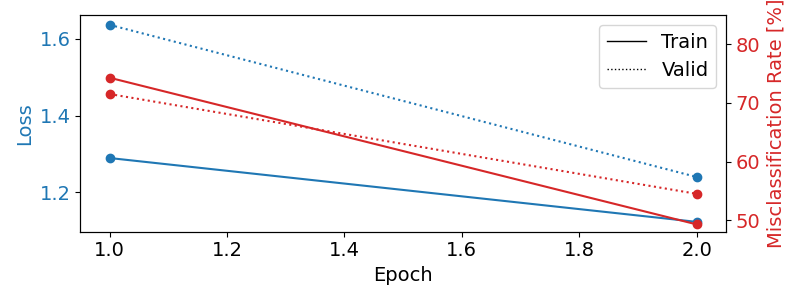
Plot training curves#
Note
Note that we drop further in the classification error and loss as in the trialwise decoding tutorial.
import matplotlib.pyplot as plt
import pandas as pd
from matplotlib.lines import Line2D

# Extract loss and accuracy values for plotting from history object
results_columns = ["train_loss", "valid_loss", "train_accuracy", "valid_accuracy"]
df = pd.DataFrame(
    clf.history[:, results_columns],
    columns=results_columns,
    index=clf.history[:, "epoch"],
)

# get percent of misclass for better visual comparison to loss
df = df.assign(
    train_misclass=100 - 100 * df.train_accuracy,
    valid_misclass=100 - 100 * df.valid_accuracy,
)

fig, ax1 = plt.subplots(figsize=(8, 3))
df.loc[:, ["train_loss", "valid_loss"]].plot(
    ax=ax1, style=["-", ":"], marker="o", color="tab:blue", legend=False, fontsize=14
)

ax1.tick_params(axis="y", labelcolor="tab:blue", labelsize=14)
ax1.set_ylabel("Loss", color="tab:blue", fontsize=14)

ax2 = ax1.twinx()  # instantiate a second axes that shares the same x-axis

df.loc[:, ["train_misclass", "valid_misclass"]].plot(
    ax=ax2, style=["-", ":"], marker="o", color="tab:red", legend=False
)
ax2.tick_params(axis="y", labelcolor="tab:red", labelsize=14)
ax2.set_ylabel("Misclassification Rate [%]", color="tab:red", fontsize=14)
ax2.set_ylim(ax2.get_ylim()[0], 85)  # make some room for legend
ax1.set_xlabel("Epoch", fontsize=14)

# where some data has already been plotted to ax
handles = []
handles.append(
    Line2D([0], [0], color="black", linewidth=1, linestyle="-", label="Train")
)
handles.append(
    Line2D([0], [0], color="black", linewidth=1, linestyle=":", label="Valid")
)
plt.legend(handles, [h.get_label() for h in handles], fontsize=14)
plt.tight_layout()
Plot Confusion Matrix#
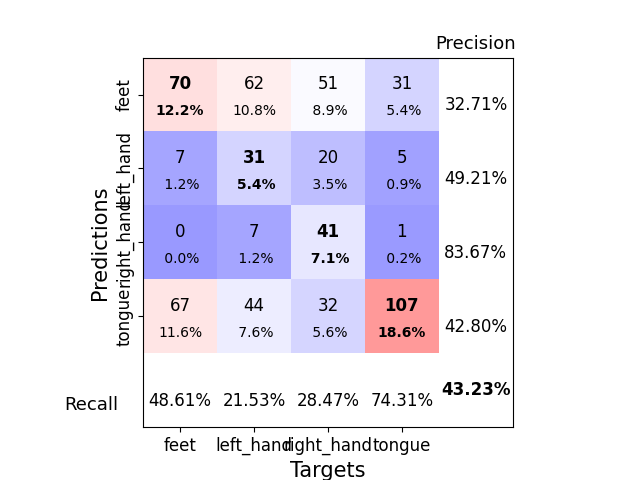
Generate a confusion matrix as in [2]
from sklearn.metrics import ConfusionMatrixDisplay

y_true = valid_set.get_metadata().target
y_pred = clf.predict(valid_set)

label_dict = valid_set.datasets[0].window_kwargs[0][1]["mapping"]
sorted_items = sorted(label_dict.items(), key=lambda kv: kv[1])
labels = [k for k, _ in sorted_items]
class_ids = [v for _, v in sorted_items]

ConfusionMatrixDisplay.from_predictions(
    y_true, y_pred, labels=class_ids, display_labels=labels
)
<sklearn.metrics._plot.confusion_matrix.ConfusionMatrixDisplay object at 0x79e91d062a20>
Predict whole trials#
The confusion matrix above counts windows. Each trial is cut into overlapping windows, and the network gives one prediction per crop of each window. To look at a whole trial, we put its windows back together in time. Where two windows overlap, we keep the predictions of the earlier window.
Three functions of braindecode.training do this. Each one takes
the trained network, clf.module_, and windows in recording order.
predict_trials()returns all trials at once.iter_trial_predictions()yields one trial at a time, so memory holds one trial instead of all of them.iter_trial_prediction_chunks()yields each trial in chunks of at mostwindows_per_chunkwindows. Its memory does not grow with the trial length, which matters when one trial is a whole recording.
We take the first four trials of the evaluation session, so this part only runs inference on a few windows.
import numpy as np
from torch.utils.data import Subset

metadata = valid_set.get_metadata()
# A trial starts at each window whose index within the trial is 0
trial_starts = np.flatnonzero(metadata["i_window_in_trial"].to_numpy() == 0)
n_trials = 4
few_trials = Subset(valid_set, range(trial_starts[n_trials]))
print(f"{n_trials} trials, {len(few_trials)} windows")
4 trials, 8 windows
predict_trials stacks the trials into an array of shape
(n_trials, n_classes, n_predictions) and returns one target per
trial. clf.predict_trials(few_trials) gives the same result.
from braindecode.training import predict_trials

trial_preds, trial_targets = predict_trials(
    clf.module_, few_trials, batch_size=batch_size
)
print(trial_preds.shape, trial_targets)
(4, 4, 592) [1. 2. 2. 1.]
iter_trial_predictions is a generator. It puts the network in eval
mode when it starts, and restores the training flag of every layer once
it is exhausted or closed. We only need the first trial. A break or
a single next would leave the generator suspended, with the network
still in eval mode, so we wrap it in contextlib.closing(). The
generator is closed at the end of the with block.
from contextlib import closing

from braindecode.training import iter_trial_predictions

with closing(
    iter_trial_predictions(clf.module_, few_trials, batch_size=batch_size)
) as trials:
    trial_pred, trial_target = next(trials)
Each prediction comes from one crop, and we place it at the time of the crop’s last sample. The network outputs logits, so we apply a softmax over the classes to plot probabilities.
crop_size = n_times - n_preds_per_input + 1  # receptive field, in samples
# Time of the last sample of each crop, in seconds after the cue
pred_times = (
    trial_start_offset_seconds
    + (crop_size - 1 + np.arange(trial_pred.shape[1])) / sfreq
)
true_class = int(trial_target)
class_names = [label.replace("_", " ") for label in labels]
colors = ["#0072B2", "#E69F00", "#009E73", "#CC79A7"]  # Okabe-Ito


def plot_class_probabilities(ax, times, logits):
    """Plot the probability of each class over time, named at the line's end."""
    probas = torch.from_numpy(logits).softmax(dim=0).numpy()
    # Keep the end labels at least 0.09 apart so that close lines stay readable
    label_y = probas[:, -1].copy()
    order = np.argsort(label_y)
    for below, above in zip(order[:-1], order[1:]):
        label_y[above] = max(label_y[above], label_y[below] + 0.09)
    for class_id, name in enumerate(class_names):
        is_true = class_id == true_class
        ax.plot(
            times, probas[class_id], color=colors[class_id], lw=2.5 if is_true else 1.2
        )
        ax.text(
            times[-1] + 0.03,
            label_y[class_id],
            f"{name} (true class)" if is_true else name,
            color=colors[class_id],
            va="center",
        )
    # Reference lines: the target of the true class and the chance level
    ax.axhline(1, color=colors[true_class], lw=1, ls="--")
    ax.text(times[0] + 0.03, 1.01, "target of the true class", color=colors[true_class])
    ax.axhline(1 / n_classes, color="0.5", lw=1, ls=":")
    ax.text(times[0] + 0.03, 1 / n_classes + 0.02, "chance", color="0.4")
    ax.set(xlim=(times[0], times[-1]), ylim=(0, 1.1), ylabel="Probability")
    ax.set_xlabel("Time of the crop's last sample after the cue (s)")
    ax.spines[["top", "right"]].set_visible(False)


fig, ax = plt.subplots(figsize=(7, 3), layout="constrained")
plot_class_probabilities(ax, pred_times, trial_pred)
ax.set_title("Class probabilities across the first test trial")
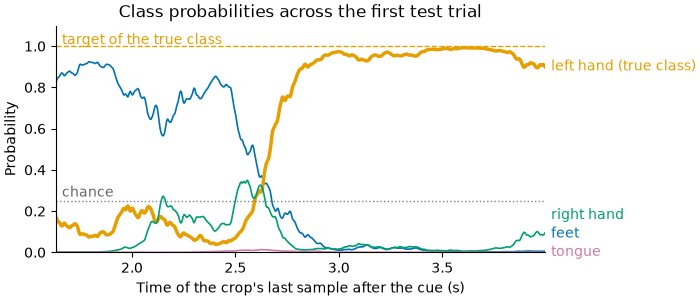
Text(0.5, 1.0, 'Class probabilities across the first test trial')
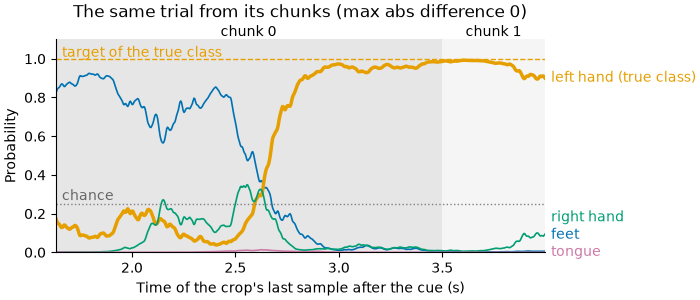
iter_trial_prediction_chunks cuts each trial into chunks of at most
windows_per_chunk windows. Each chunk records its trial and its
prediction_start, the offset of its first prediction within the
trial’s predictions. This offset counts predictions. It is not a sample
index of the recording. With windows_per_chunk=1, each window of the
trial gives one chunk.
from braindecode.training import iter_trial_prediction_chunks

with closing(
    iter_trial_prediction_chunks(
        clf.module_, few_trials, windows_per_chunk=1, batch_size=batch_size
    )
) as chunks:
    first_trial = []
    for chunk in chunks:
        if chunk.trial_index > 0:
            break
        first_trial.append(chunk)

for chunk in first_trial:
    print(
        f"trial {chunk.trial_index}, prediction_start {chunk.prediction_start}, "
        f"prediction shape {chunk.prediction.shape}"
    )
assembled = np.concatenate([chunk.prediction for chunk in first_trial], axis=1)
max_abs_diff = np.abs(assembled - trial_pred).max()
print(f"Max abs difference to iter_trial_predictions: {max_abs_diff}")
trial 0, prediction_start 0, prediction shape (4, 467)
trial 0, prediction_start 467, prediction shape (4, 125)
Max abs difference to iter_trial_predictions: 0.0
We plot the same trial from its chunks and shade each chunk. Put back together, the chunks give the trial of the first figure. The largest absolute difference, printed above, is 0.0 on CPU.
fig, ax = plt.subplots(figsize=(7, 3), layout="constrained")
for i_chunk, chunk in enumerate(first_trial):
    first = chunk.prediction_start
    last = first + chunk.prediction.shape[1] - 1
    # Span from half a sample before the first prediction to half after the last
    start, stop = pred_times[first] - 0.5 / sfreq, pred_times[last] + 0.5 / sfreq
    ax.axvspan(start, stop, color=["0.9", "0.96"][i_chunk % 2], lw=0)
    # Chunk name above the axes: x in seconds, y in axes coordinates
    ax.text(
        (start + stop) / 2,
        1.0,
        f"chunk {i_chunk}",
        ha="center",
        va="bottom",
        transform=ax.get_xaxis_transform(),
    )
plot_class_probabilities(ax, pred_times, assembled)
ax.set_title(
    f"The same trial from its chunks (max abs difference {max_abs_diff:.2g})", pad=16
)
Text(0.5, 1.0, 'The same trial from its chunks (max abs difference 0)')
The API reference of each function gives the details, such as the
accepted loader_kwargs and the shape of the returned targets.
References#
Total running time of the script: (1 minutes 32.820 seconds)
Run this example
